用 JavaScript 和 WebView2 构建桌面应用
发布于: 3/21/2026 | 作者: DevScholar
用 JavaScript 和 WebView2 构建桌面应用
WebView2 是微软推出的嵌入式浏览器控件,基于 Chromium 内核,可以嵌入到 WinForms、WPF、WinUI 等桌面应用框架中。与 Electron 不同,WebView2 使用系统已安装的 Edge 浏览器运行时,不需要在每个应用安装包中捆绑完整的 Chromium,因此应用体积可以很小。通过 Node PS1 for .NET,我们可以在 JavaScript 中创建 WPF 窗口并嵌入 WebView2 控件,用熟悉的 HTML、CSS、JavaScript 构建界面,同时保留调用原生 API 的能力。
WebView2 需要额外的 DLL 文件,这些 DLL 不在 .NET Framework 中,需要单独下载。node-ps1-dotnet-examples 项目提供了 webview2-install.js 脚本来自动下载这些依赖。运行 node scripts/webview2-install.js install 后,DLL 会被下载到 runtimes/webview2 目录下。程序启动时需要加载这两个 DLL:Microsoft.Web.WebView2.Core.dll 包含核心功能,Microsoft.Web.WebView2.Wpf.dll 包含 WPF 控件封装。
加载 DLL 使用 System.Reflection.Assembly.LoadFrom 方法,这是 .NET 的动态加载机制。加载完成后通过反射获取 WebView2 类型并创建实例。WebView2 控件需要一些初始化配置,主要是设置用户数据目录,这是 WebView2 存储缓存、Cookie、localStorage 等数据的地方。每个应用应该使用独立的数据目录,通常放在临时文件夹中,程序退出时可以清理。
import dotnet from '@devscholar/node-ps1-dotnet';
import * as fs from 'node:fs';
import * as path from 'node:path';
import * as os from 'node:os';

const webview2LibPath = '/path/to/webview2/libs';
const coreDllPath = path.join(webview2LibPath, 'Microsoft.Web.WebView2.Core.dll');
const wpfDllPath = path.join(webview2LibPath, 'Microsoft.Web.WebView2.Wpf.dll');

const System = dotnet.System as any;
const Windows = System.Windows;
const Controls = System.Windows.Controls;

System.Reflection.Assembly.LoadFrom(coreDllPath);
System.Reflection.Assembly.LoadFrom(wpfDllPath);

const WebView2WpfAssembly = System.Reflection.Assembly.LoadFrom(wpfDllPath);
const WebView2Type = WebView2WpfAssembly.GetType('Microsoft.Web.WebView2.Wpf.WebView2');
const webView = new WebView2Type();

const CreationPropertiesType = WebView2WpfAssembly.GetType('Microsoft.Web.WebView2.Wpf.CoreWebView2CreationProperties');
const props = new CreationPropertiesType();
props.UserDataFolder = fs.mkdtempSync(path.join(os.tmpdir(), 'webview2-'));
webView.CreationProperties = props;

const browserWindow = new Windows.Window();
browserWindow.Title = 'WebView2 App';
browserWindow.Width = 800;
browserWindow.Height = 600;
browserWindow.WindowStartupLocation = Windows.WindowStartupLocation.CenterScreen;

const grid = new Controls.Grid();
browserWindow.Content = grid;
grid.Children.Add(webView);

const htmlPath = path.resolve('./index.html');
webView.Source = new System.Uri(htmlPath);

const app = new Windows.Application();
app.Run(browserWindow);
WebView2 的 Source 属性接受一个 URI,可以是本地文件路径也可以是网络地址。设置 Source 后控件会自动加载页面。页面加载完成后会触发 NavigationCompleted 事件,可以在回调中执行后续操作。
WebView2 初始化是异步的,设置 CreationProperties 和 Source 后,控件会在后台创建 CoreWebView2 对象。初始化完成后触发 CoreWebView2InitializationCompleted 事件,此时才能访问 CoreWebView2 属性进行高级操作。CoreWebView2 提供了丰富的 API,比如执行 JavaScript 代码、接收网页消息、处理导航事件等。
网页和原生代码之间的通信通过 WebMessage 机制实现。网页端调用 window.chrome.webview.postMessage(message) 发送消息,原生端通过 CoreWebView2 的 WebMessageReceived 事件接收。反过来,原生端调用 CoreWebView2.ExecuteScript 或 PostWebMessage 可以向网页发送消息。下面这段代码在 WebView2 初始化完成后注入一段脚本,把 console.log 重定向到 webview.postMessage,这样网页的 console.log 输出就能在原生端看到。
webView.add_CoreWebView2InitializationCompleted((sender: any, e: any) => {
    if (e.IsSuccess) {
        const coreWebView2 = webView.CoreWebView2;

        coreWebView2.add_WebMessageReceived((sender2: any, e2: any) => {
            const message = e2.TryGetWebMessageAsString();
            if (message) {
                console.log('[WebView2] ' + message);
            }
        });

        const script = `
            (function() {
                var originalLog = console.log;
                console.log = function(msg) {
                    originalLog(msg);
                    if (window.chrome && window.chrome.webview) {
                        window.chrome.webview.postMessage(msg);
                    }
                };
            })();
        `;
        coreWebView2.ExecuteJavaScript(script);
    }
});
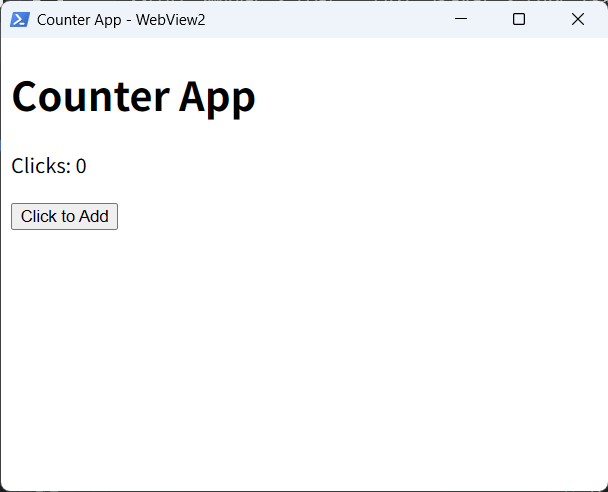
网页端的代码就是普通的 HTML 和 JavaScript,不需要任何特殊处理。下面是一个简单的计数器页面,点击按钮时更新显示并通过 postMessage 通知原生端。
<!DOCTYPE html>
<html>
<head>
    <title>Counter</title>
</head>
<body>
    <h1>Counter App</h1>
    <p id="display">Clicks: 0</p>
    <button id="btn">Click to Add</button>

    <script>
        let clickCount = 0;
        const display = document.getElementById('display');
        const button = document.getElementById('btn');

        button.addEventListener('click', function() {
            clickCount++;
            const message = 'Button clicked ' + clickCount + ' times';
            display.textContent = message;

            if (window.chrome && window.chrome.webview) {
                window.chrome.webview.postMessage(message);
            }
        });
    </script>
</body>
</html>
这种架构的好处是界面层完全使用 Web 技术开发,可以利用成熟的前端框架和工具链,同时原生层提供系统 API 访问能力。与 Electron 相比,应用安装包体积可以控制在几 MB 以内,因为不需要捆绑 Chromium。与纯原生开发相比,界面开发效率更高,Web 开发者可以直接上手。
需要注意 WebView2 运行时的安装问题。Windows 10/11 的新版本已经预装了 WebView2 运行时,但旧版本 Windows 可能需要用户手动安装。微软提供了在线安装包和离线安装包两种分发方式,开发者可以根据目标用户群体选择。对于企业内部应用,可以假设运行时已安装或通过组策略统一部署。对于面向公众的应用,建议在安装程序中检查并提示安装运行时。
运行示例的方法是先执行 node scripts/webview2-install.js install 下载依赖,然后执行 node start.js your-file.ts 启动程序。完整示例可以在 node-ps1-dotnet-examples 仓库的 wpf/webview2-browser 目录中找到。