Writing Adwaita-style Apps with JavaScript
Published: 3/21/2026 | Author: DevScholar
Writing Adwaita-style Apps with JavaScript
Adwaita is the design language and default theme of the GNOME desktop environment, and libadwaita is the GTK4 library that implements this design language. It provides a series of controls and styles that conform to GNOME Human Interface Guidelines (HIG), making it easier for developers to create applications consistent with the system style. Through Node with GJS, JavaScript developers can also use libadwaita to build modern Linux desktop applications.
libadwaita needs to be installed separately. Ubuntu/Debian users run apt install libadwaita-1-0, Fedora users run dnf install libadwaita, Arch users run pacman -S libadwaita. After installation, import the Adw module in code, the version number is 1.
The entry point for libadwaita applications is Adw.Application, which inherits from Gtk.Application and additionally handles Adwaita-specific features like theme switching. The window uses Adw.ApplicationWindow instead of Gtk.ApplicationWindow, which supports adaptive layout and automatically adjusts on narrow screens. The most commonly used layout component is Adw.ToolbarView, which provides a content area with top and bottom toolbars.
import Gtk from 'gi://Gtk?version=4.0';
import Adw from 'gi://Adw?version=1';

let clickCount = 0;

const app = new Adw.Application({ application_id: 'org.adwaita.counter' });

app.connect('activate', () => {
    const window = new Adw.ApplicationWindow({
        application: app,
        title: 'Adwaita Counter App',
        default_width: 400,
        default_height: 300
    });

    const toolbarView = new Adw.ToolbarView();

    const headerBar = new Adw.HeaderBar({
        title_widget: new Gtk.Label({ label: 'Adwaita Counter App' })
    });
    toolbarView.add_top_bar(headerBar);

    const box = new Gtk.Box({
        orientation: Gtk.Orientation.VERTICAL,
        spacing: 10,
        halign: Gtk.Align.CENTER,
        valign: Gtk.Align.CENTER
    });
    box.set_margin_start(20);
    box.set_margin_end(20);
    box.set_margin_top(20);
    box.set_margin_bottom(20);

    const label = new Gtk.Label({
        label: 'Clicks: 0',
        css_classes: ['title-1']
    });

    const button = new Gtk.Button({
        label: 'Click to Add',
        css_classes: ['suggested-action']
    });

    button.connect('clicked', () => {
        clickCount++;
        label.set_label(`Clicked ${clickCount} times`);
    });

    box.append(label);
    box.append(button);

    toolbarView.set_content(box);
    window.set_content(toolbarView);
    window.present();
});

app.run([]);
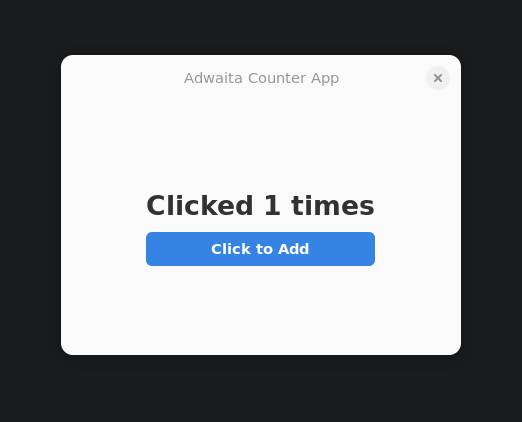
Adw.HeaderBar is an Adwaita-style title bar that integrates the window title and control buttons (close, minimize, maximize) together, saving the space occupied by traditional menu bars. The title_widget property can set the control for the title area, here using a Label to display the application name. HeaderBar can also add buttons on both sides of the title through add_start_title_widget and add_end_title_widget, commonly used for placing search buttons, menu buttons, etc.
ToolbarView’s add_top_bar method adds a top toolbar, and set_content method sets the main content area. This layout structure gives the application a consistent title bar style automatically, without manually handling window decorations. Bottom toolbars can be added through add_bottom_bar, commonly used for placing action buttons or status information.
Adwaita’s style system is built on GTK4’s CSS mechanism but provides a set of predefined CSS class names. title-1 is the largest title style, title-2, title-3, title-4 get progressively smaller. suggested-action is the suggested action button style, destructive-action is the dangerous action (like delete) style. These styles automatically adapt to the system’s light and dark themes, developers don’t need to care about specific color values.
libadwaita also provides some advanced controls. Adw.PreferencesPage and Adw.PreferencesGroup are used to build settings interfaces, Adw.Clamp can limit the maximum width of content to maintain readability on large screens, Adw.StatusPage is used to display empty states or error prompts. Adw.Toast and Adw.ToastOverlay provide a lightweight message notification mechanism.
The application_id of Adwaita applications is important, it not only identifies the application but also affects theme switching, desktop integration, and other functions. It’s recommended to use reverse domain name format, like org.example.myapp. If the application needs to run in a sandbox (like Flatpak), this ID also needs to match the ID in the Flatpak manifest.
Compared to pure GTK4 applications, the benefit of using libadwaita is automatically getting an appearance and behavior consistent with the GNOME system. Applications will follow the system theme to switch between light and dark modes, control styles conform to HIG specifications, and users can get started without additional learning. The downside is that the application style is tied to GNOME, and may look out of place in other desktop environments (like KDE Plasma). If the goal is cross-desktop generic Linux applications, you may need to consider using pure GTK4 with custom styles.
To run the example, execute node start.js your-file.ts. The complete example can be found in the adwaita directory of the node-with-gjs-examples repository. Since libadwaita is only available on Linux, this solution currently only supports the Linux platform.